Control API: drive bots from outside (scripts and AI)
The app's local HTTP interface — switch it on, copy the token, read status and log, and load, start, pause and stop bots from PowerShell, your own program or an AI assistant.
After this article you can operate FlowBotCommander from outside: from PowerShell, from a program of your own, or from an AI assistant that starts and stops your bots via "function calling". No programming knowledge needed — the examples below can be copied as they are.
What the control API is
The app contains a small HTTP server. It runs only on your computer (address 127.0.0.1), is off by
default and lets nobody in without your token. Through this interface a script can
- query the state (running, paused, which bot is loaded),
- follow the log,
- list the bots in the bots folder,
- load, start, pause and stop a bot.
What it deliberately cannot do: edit bots, set variables or create nodes — that stays in the editor. The panic hotkey (Pause key) stops the bot at any time, whatever the API is doing.
Step 1 — Switch it on and copy the token
- Open the menu Tools → Control API….
- Tick Enable control API (opt-in).
- Leave the port (8765) or change it if another program uses it.
- Click Copy next to the token — you need it in a moment. New creates a fresh token; the old one stops working.
- Apply. The bottom shows "● Running on http://127.0.0.1:8765" and the log gets a 🌐 line with the address.
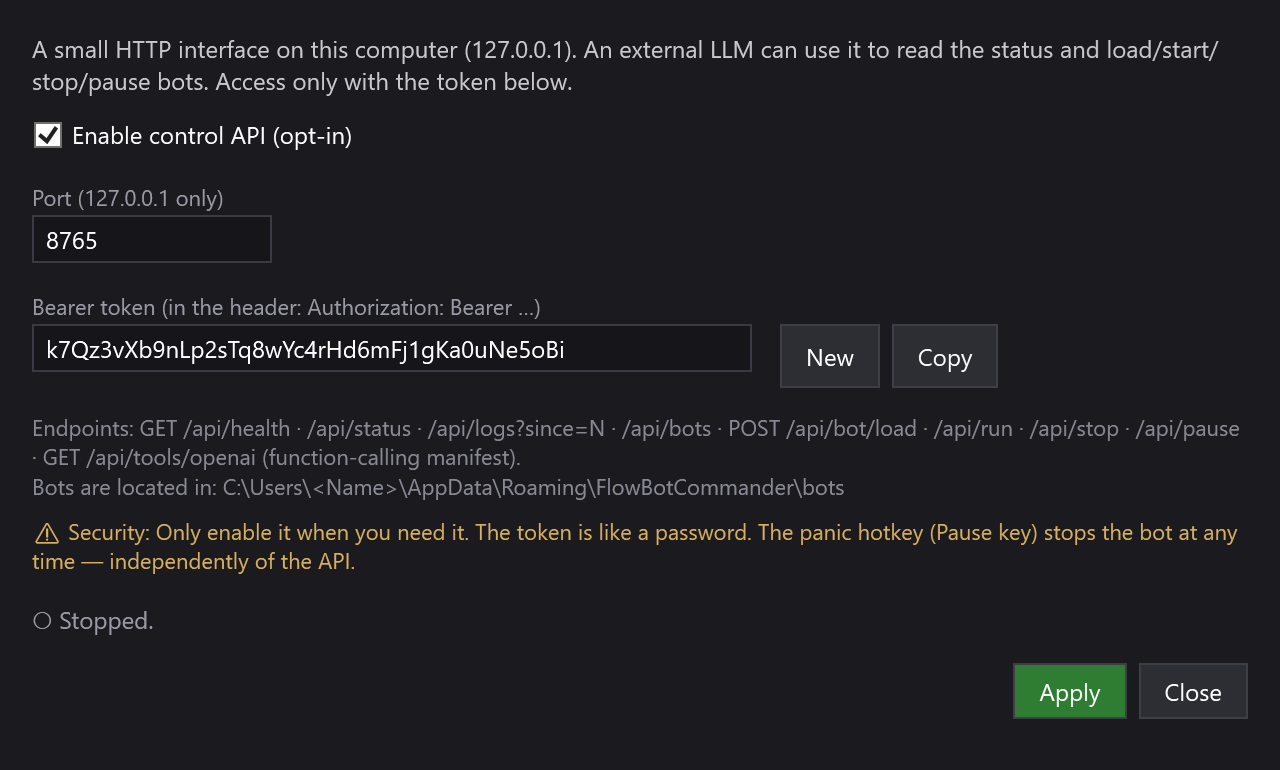
The setting is saved: the next time the app starts, the API runs again until you remove the tick. The token is stored encrypted on your computer — never inside a bot and never on our server.
Step 2 — Put bots into the bots folder
The API lists and loads bots only from the folder %AppData%\FlowBotCommander\bots. To get there:
Win+R, type %AppData%\FlowBotCommander\bots, Enter (create the folder the
first time). Save your bots there with File → Save as… — each one is called name.bot.json.
Step 3 — The first request
Open PowerShell and insert your token:
$token = "YOUR-TOKEN-HERE"
$h = @{ Authorization = "Bearer $token" }

Invoke-RestMethod http://127.0.0.1:8765/api/health              # works without a token
Invoke-RestMethod -Headers $h http://127.0.0.1:8765/api/status  # everything else needs the token
The answer to /api/status looks like this:
{ "running": false, "paused": false, "nodeCount": 6, "logCount": 12, "loadedBot": "clicker-heroes-komplett.bot.json" }
The token goes into the header Authorization: Bearer <token> — with a space after "Bearer". If it is missing
or wrong, the API answers with 401 and {"error":"unauthorized"}.
Step 4 — Load, start, pause, stop a bot
# Which bots are there?
Invoke-RestMethod -Headers $h http://127.0.0.1:8765/api/bots

# Load a bot — name with or without .bot.json, part of the name is enough
Invoke-RestMethod -Headers $h -Method Post -ContentType "application/json" `
    -Body '{ "name": "clicker-heroes-komplett" }' http://127.0.0.1:8765/api/bot/load

# Start
Invoke-RestMethod -Headers $h -Method Post http://127.0.0.1:8765/api/run

# Pause and resume
Invoke-RestMethod -Headers $h -Method Post -ContentType "application/json" `
    -Body '{ "paused": true }'  http://127.0.0.1:8765/api/pause
Invoke-RestMethod -Headers $h -Method Post -ContentType "application/json" `
    -Body '{ "paused": false }' http://127.0.0.1:8765/api/pause

# Stop
Invoke-RestMethod -Headers $h -Method Post http://127.0.0.1:8765/api/stop
Every action answers with { "ok": true, "message": "…" } or { "ok": false, "message": "reason" } — for
example "Läuft bereits." (already running) or "Bot 'xyz' nicht gefunden." (bot not found). The messages are
currently in German.
Following the log
/api/logs?since=N returns the log lines from line N on (0 = all). Remember how many lines you have read and
ask from there next time — that way you only get what is new:
$lines = Invoke-RestMethod -Headers $h "http://127.0.0.1:8765/api/logs?since=0"
$lines.Count        # e.g. 12
Invoke-RestMethod -Headers $h "http://127.0.0.1:8765/api/logs?since=12"   # only the new lines
All endpoints at a glance
| Call | Purpose | Token needed |
|---|---|---|
GET /api/health |
sign of life of the app | no |
GET /api/status |
running/paused, number of nodes and log lines, loaded bot | yes |
GET /api/logs?since=N |
log lines from N on | yes |
GET /api/bots |
bots in the bots folder (name, path, size, modified date) | yes |
POST /api/bot/load { "name": "…" } |
load a bot into the editor | yes |
POST /api/run |
start the loaded bot | yes |
POST /api/stop |
stop the run | yes |
POST /api/pause { "paused": true/false } |
pause or resume | yes |
GET /api/tools/openai |
ready-made function-calling manifest for AI assistants | yes |
Connecting an AI assistant
GET /api/tools/openai returns a ready-made tool list in OpenAI format ("tools"). It describes every function —
get_status, get_logs, list_bots, load_bot, run_bot, stop_bot, pause_bot — so that a language
model calls them correctly on its own. The usual setup:
- Your script fetches the manifest and hands it to the AI service as tools.
- You tell the AI: "Start the bot clicker-heroes-komplett and tell me when an error shows up in the log."
- The AI answers with a tool call (e.g.
run_bot); your script performs the matching HTTP request and returns the result.
The app itself calls no AI service — the bridge between AI and API is your script. That way your token stays on your computer.
Security
- The API is reachable only from your own computer. Other devices on the network cannot get in — this is intentional and cannot be changed.
- The token is like a password: do not share it, do not put it into bots or screenshots. If in doubt click New and Apply.
- Switch the API off when you do not need it.
- Pause always stops the bot — even in the middle of an API action.
If it does not work
- "Connection refused" — the API is not switched on, the app is not running, or the port is different (see the Control API… window).
- 401 unauthorized — the token is missing or wrong, or the word "Bearer" is missing from the header.
- A "❌ Steuer-API: …" line in the log when applying — usually the port is in use. Enter another port (e.g. 8766) and apply again.
- "Bot 'xyz' nicht gefunden." — the bot is not in
%AppData%\FlowBotCommander\botsor has a different name.GET /api/botsshows what the API sees. - "Start nicht möglich (kein Start-Node?)" — the loaded bot has no Start node or is already running.